

Table of Contents
- Introduction
- What are Shopify Payments?
- What are the Features of Shopify Payments?
- What are the Methods of Processing Shopify Payments?
- What are the Other Common Payment Providers for Your Shopify Store?
- What are the Pros and Cons of Using Shopify Payments?
- How to Set Up Shopify Payments?
- Which Countries Support Shopify Payments?
- What are the Minimum Transaction Amounts Using Shopify Payments?
- How to Handle Pending Charges and Delayed Payments Through Shopify Payments?
- Conclusion
If you are starting an online store with Shopify, understanding how payments work is crucial. That’s where Shopify Payments comes in. As Shopify’s built-in payment processing solution, it removes the need for third-party gateways. It allows you to accept major credit cards, debit cards, digital wallets, and even local payment methods directly from your dashboard.
It streamlines your checkout, simplifies payouts, and enhances security with advanced fraud protection tools. Whether you are a beginner launching your first store or upgrading your existing setup, Shopify Payments offers a seamless and efficient way to manage transactions. This quick guide will help you understand what Shopify Payments is, its features, pros and cons, setup process, and important details you need to know before enabling it.
What are Shopify Payments?
Shopify Payments is Shopify’s own integrated payment processing solution. It allows admins to accept online payments without requiring a third-party payment provider or merchant account. Shopify Payments supports all payment methods, such as:
- Credit cards or Debit cards
- Accelerated checkouts like Apple Pay, Google Pay, and Shop Pay
- Local payment
- Crypto
Along with this, it also provides advanced features like fraud detection, encryption, and real-time payout management, directly from your Shopify admin dashboard.
What are the Features of Shopify Payments?
Shopify Payments offers a robust, all-in-one solution that streamlines transactions and boosts your online store’s efficiency. Here’s what sets it apart:
Versatile Payment Acceptance: Seamlessly handle major credit and debit cards, plus fast-checkout options like Apple Pay, Google Pay, and Shop Pay. It also supports region-specific methods tailored to your location and customers.
Effortless Setup: When you launch your Shopify store with Shopify Payments enabled, it’s ready to process payments out of the box.
Automated Payouts: Get your sales funds deposited straight into your bank account on a regular schedule, keeping your cash flow smooth and predictable.
Customizable Pricing: Transaction fees vary based on your Shopify plan, so you can pick one that aligns with your business goals and budget.
Seamless Integration: Everything from payment processing to order handling happens within the Shopify platform, making store management a breeze.
Top-Notch Security: Advanced encryption, fraud detection, and 3D Secure authentication safeguard customer data and transactions.
Multi-Currency Flexibility: Sell and receive payments in various currencies, with multi-currency payout options available on select plans.
HSA/FSA Card Support: Eligible U.S. sellers of medical products can accept Health Savings Account and Flexible Spending Account cards.
These capabilities make Shopify Payments a secure, user-friendly powerhouse for merchants, eliminating the hassle of third-party integrations and empowering faster, safer sales.
What are the Methods of Processing Shopify Payments?
Through Shopify Payments, you can process payments using several methods depending on your location and setup:
Credit and Debit Cards: It can accept major card brands like Visa, Mastercard, American Express, Maestro, UnionPay, and others, once you activate Shopify Payments.
Accelerated Checkouts: These quick payment options are automatically activated with Shopify Payments and include Apple Pay, Google Pay, and Shop Pay.
Local Payment Methods: Based on your store’s location and your customers’ regions, you can enable region-specific payment options like Bancontact, iDEAL, Klarna, EPS, TWINT, and others. Activation happens in the Payments area of your Shopify admin.
Cryptocurrency Payments: You can also process payments in cryptocurrency via USD Coin (USDC). This option provides customers with more payment options and operates on the Base Blockchain Network, which offers faster and cheaper transactions. To accept USDC payments, you must have Shopify Payments activated and be located in a supported region such as parts of North America, Europe, or Asia-Pacific.
In-Person Payments: In compatible countries, Shopify Payments works with Shopify POS for face-to-face transactions, using Shopify-approved card readers or third-party terminals.
All these payment options and their setup are handled through the Payments tab in your Shopify admin. The exact methods available vary by your store’s country and your customers’ locations.
What are the Other Common Payment Providers for Your Shopify Store?
Apart from Shopify Payments, users can integrate various other payment providers into their store. Some of these are:
Stripe: Stripe is a premier online payment platform enabling businesses to accept payments securely. Its key features include API integration for websites/apps, support for credit cards, digital wallets, and bank transfers, plus subscription management, invoicing, and POS systems.
It benefits users through PCI-compliant security, fraud protection, global multi-currency support, real-time analytics dashboards, and low-cost pricing with no setup fees, ideal for startups and enterprises.
Amazon Pay: Amazon Pay is Amazon’s secure online payment service that lets customers use their Amazon account details to pay on third-party websites and apps. Amazon Pay’s key features include one-click checkout, support for credit/debit cards, bank accounts, and digital wallets, integration via APIs, and tools for subscriptions and recurring payments.
Its benefits encompass enhanced trust and familiarity from the Amazon brand, robust fraud protection and PCI compliance, global reach with multi-currency support, simplified user experience reducing cart abandonment, and no setup fees for merchants, making it a convenient option for e-commerce businesses.
Afterpay: Afterpay is a popular buy now, pay later (BNPL) service that enables customers to split purchases into four interest-free installments over six weeks, with features like seamless integration with e-commerce platforms via APIs, support for online and in-store transactions, real-time approval, and tools for merchants to manage payments and track customer behaviour.
Benefits include increased conversion rates by offering flexible payment options, reduced cart abandonment, built-in fraud protection and compliance, global availability in multiple countries, and no upfront fees for businesses, making it ideal for retailers aiming to boost sales and customer loyalty.
Braintree: Braintree, a PayPal-owned payment platform, offers comprehensive tools for processing payments across online, mobile, and in-person channels. Key features include flexible API integrations for custom payment experiences, support for credit cards, digital wallets, PayPal, and local methods, secure data vaulting, subscription management, and advanced fraud prevention.
Benefits feature PCI-compliant security, global multi-currency capabilities, real-time analytics, transparent pricing without hidden fees, and easy integration with PayPal’s network, ideal for merchants needing scalable and reliable payment solutions.
Adyen: Adyen is a leading global payment platform that enables businesses to accept and manage payments seamlessly across channels. Key features include a unified API for easy integration, support for over 150 payment methods, including cards, wallets, and local options, advanced risk management and fraud prevention, real-time analytics, and tools for subscriptions and marketplaces.
Benefits encompass PCI-compliant security, multi-currency and cross-border capabilities, transparent pricing with no hidden fees, scalable infrastructure for high-volume transactions, and a focus on innovation, making it suitable for enterprises and fintechs seeking reliable, future-proof payment solutions.
If you need help setting up Shopify Payments or other secure payment options, working with a Shopify expert can make the process easier and safer.
What are the Pros and Cons of Using Shopify Payments?
Pros of Using Shopify Payments:
One Stop Assistance: It is integrated in Shopify. It simplifies the payment processing procedure by consolidating payments, order management, and other functions in a single platform.
Multiple Payment Methods:It accepts multiple payment methods like Cards (Credit cards, Debit cards) and accelerated checkouts (Apple Pay, Shop Pay, Google Pay, etc.) along with local payment methods of your region (or country).
Automatic Set Up and Payouts: When you create your Shopify store with Shopify Payments activated, it set up automatically to accept payments. Funds from sales are automatically deposited into your bank account regularly.
Flexible Card Rates:Card rates depend on your Shopify subscription plan, which allows you to choose a plan that fits your business.
Secure Transactions:Uses advanced encryption and fraud detection measures like 3D Secure authentication.
Cons of Using Shopify Payments:
Availability: It is only available in certain countries and regions.
Limited In-Person Payment Support: In some countries, Shopify Payments is only for online sales; in-person payments require third-party processors.
Currency Limitations: Payout currencies and multi-currency payout fees depend on your location and plan.
Subscription Compatibility: Some payment methods and features may have limitations with subscription products.
How to Set Up Shopify Payments?
To set up Shopify Payments in your store, follow these steps:
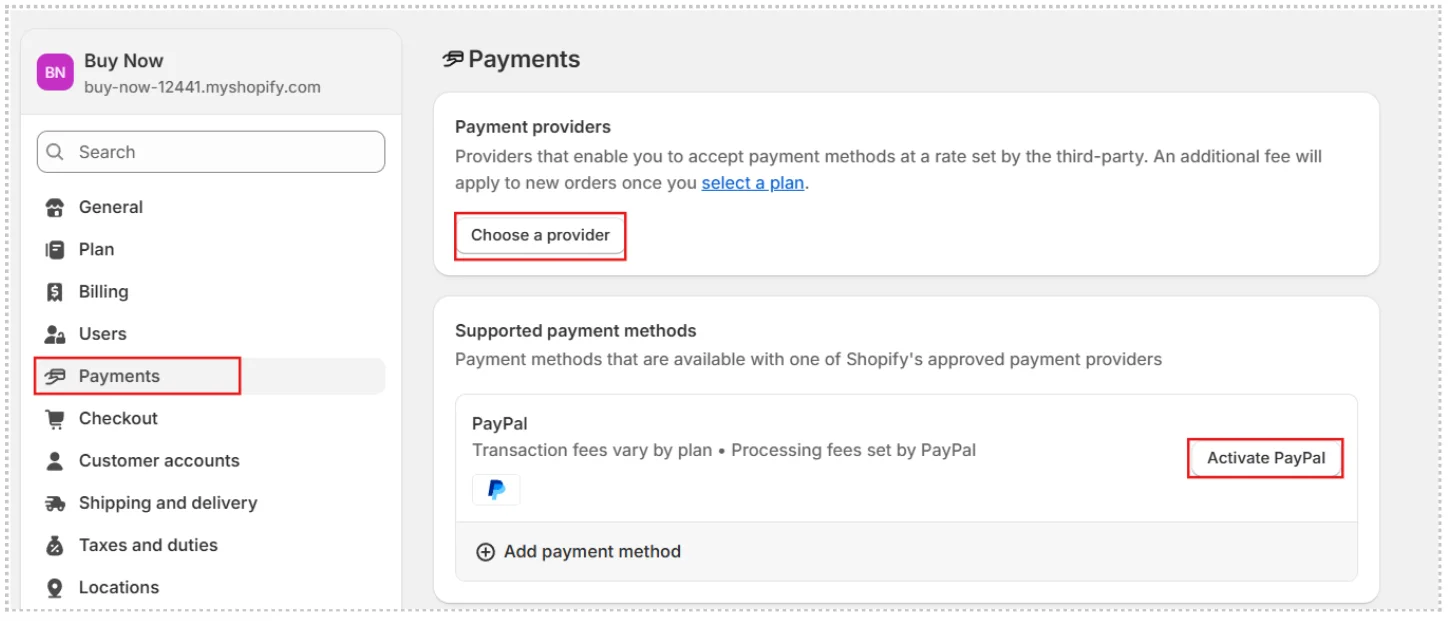
- Log in to your Shopify admin.
- Go to Settings > Payments.
- In the Shopify Payments section, if you haven’t set up a payment provider yet, click Complete account setup. If you have another payment provider activated, click Activate Shopify Payments to replace it.
- Enter the required details about your store and your banking information.
- Click Save.
- Click Complete account setup to finish the verification process.
Note: Before activating Shopify Payments, confirm that your store operates in a supported country and that you’ve enabled two-step authentication for added security. Note that your payouts could be delayed until the verification process finishes.
You can also configure Shopify Payments through the Shopify mobile app by going to Settings > Payments and proceeding with the comparable steps.
Need help setting up Shopify payment gateways? Shine Dezign Infonet can help you choose, set up, and secure the right payment options for your store, so you can accept payments smoothly and with confidence.
Which Countries Support Shopify Payments?
| Supported Countries | Payment Methods |
|---|---|
| USA | Visa, Mastercard, American Express, Discover, Diner’s Club, Apple Pay, Google Pay, Shop Pay, Bancontact, iDEAL, and other local payment methods |
| UK | |
| Australia | |
| Belgium | |
| Canada | |
| Denmark | |
| France | |
| Germany | |
| Greece | |
| Ireland | |
| Italy | |
| Japan | |
| Mexico |
What are the Minimum Transaction Amounts Using Shopify Payments?
| Transaction Currency | Minimum Transaction Amount |
|---|---|
| USD, CAD, AUD, NZD, SGD | $0.50 |
| BGN | лв1.00 |
| CHF | 0.50 Fr |
| CZK | Kč 15.00 |
| DKK | 2.50-kr. |
| EUR | €0.50 |
| GBP | £0.30 |
| HUF | 175.00 Ft |
| HKD | $4.00 |
| JPY | ¥50 |
| MXN | $10 |
| NOK | 3.00-kr. |
| PLN | 2.00 zł |
| RON | lei2.00 |
| SEK | 3.00 kr |
How to Handle Pending Charges and Delayed Payments Through Shopify Payments?
To handle pending charges and delayed payments, keep the following things in mind:
Pending Charges: Banks typically display charges right away during a payment attempt, even if it doesn’t succeed. These show up as pending charges and generally clear automatically within 3-5 business days.
Communicating with Customers: If a customer reaches out about an unfamiliar charge, verify if there’s a matching order in your records. If not, inform them it’s probably a pending authorization from an unsuccessful payment try that will reverse shortly. They can also verify with their bank.
Payment Pending Status: Orders marked as Payment pending may prevent you from editing, cancelling, or manually charging until the payment clears or times out. This status commonly occurs with alternative methods like cryptocurrency or wire transfers.
Expiry of Pending Payments: Pending payments come with an expiration date, usually around a week. If processing doesn’t finish by then, the status updates to Expired.
Manual Actions: For orders with pending payments, you can issue invoices or payment reminders to prompt customers to finalize the transaction.
Always hold off on fulfilling orders until the payment status shows as Paid to guarantee receipt of funds. For additional information, refer to your payment provider’s guidelines and Shopify admin alerts.
Conclusion
Shopify Payments is a powerful, beginner-friendly solution that simplifies how you accept and manage payments in your online store. With built-in security, fast checkouts, automated payouts, and support for multiple payment types, it offers everything you need without the hassle of external processors.
While availability varies by country and certain limitations apply, most merchants find it to be the easiest and most efficient way to handle transactions on Shopify. By understanding how it works and how to set it up, you can create a smoother, safer checkout experience for your customers and keep your store running efficiently from day one.