
Table of Contents
Key Takeaways
- You can easily remove “Powered by Shopify” from your store footer using two methods: language editor (no code), theme code editing, or CSS.
- The language editor method is the simplest and safest option for beginners.
- Editing the footer.liquid file gives you full control but requires basic code awareness.
- Using CSS is a quick fallback to hide the text instantly without deleting it.
- Removing the tag helps strengthen your brand identity and makes your store look more professional.
Launching an online store with Shopify is one of the fastest ways to start selling online. However, by default, every new store includes a small “Powered by Shopify” message in the footer and on the password page. While this tag helps promote Shopify’s platform, it doesn’t necessarily add value to your brand.
For store owners aiming to build a strong, independent identity, even small details like footer text can influence how professional and trustworthy a website appears. Understanding what this label means, and whether you should remove it, is an important step in customizing your storefront.
What is “Powered by Shopify”?
When you launch a store on Shopify, the platform automatically adds a small “Powered by Shopify” line to the footer of every page. It also appears on the password page visitors see before your store goes live. Shopify uses this as a subtle form of self-promotion, a way to advertise its platform to every visitor across millions of stores.
The tag links back to Shopify’s website. While it builds Shopify’s brand, it does very little for yours.
Why should you Remove or Hide “Powered by Shopify”?
There are several solid reasons merchants choose to delete “Powered by Shopify” or at least hide it from their storefront:
Brand identity: Your footer should reflect your brand, not Shopify’s. Removing it helps you look like an independent, established business.
Professionalism: Third-party platform branding can make your store look like a template. A clean footer signals a polished, purpose-built storefront.
Reduce distraction: Curious shoppers may click the link and land on Shopify’s homepage instead of completing a purchase on your site.
SEO & clean code: Fewer external outbound links means cleaner code and slightly better control over your site’s link equity.
Need help customizing your Shopify store or making theme updates without affecting performance? Our Shopify support and maintenance experts can help you manage changes smoothly and keep your store running at its best.
How to remove “Powered by Shopify”?
Method 1: Language editor (easiest, no code)
Shopify stores all footer text in a “language” file, think of it as a list of labels your theme displays. One of those labels is “Powered by Shopify.” This method lets you open that list and simply blank out that label. Once it’s empty, your theme has nothing to show, so the text disappears.
1) Log in to your Shopify Admin dashboard.
2) In the left sidebar, click Online Store, then select Themes.
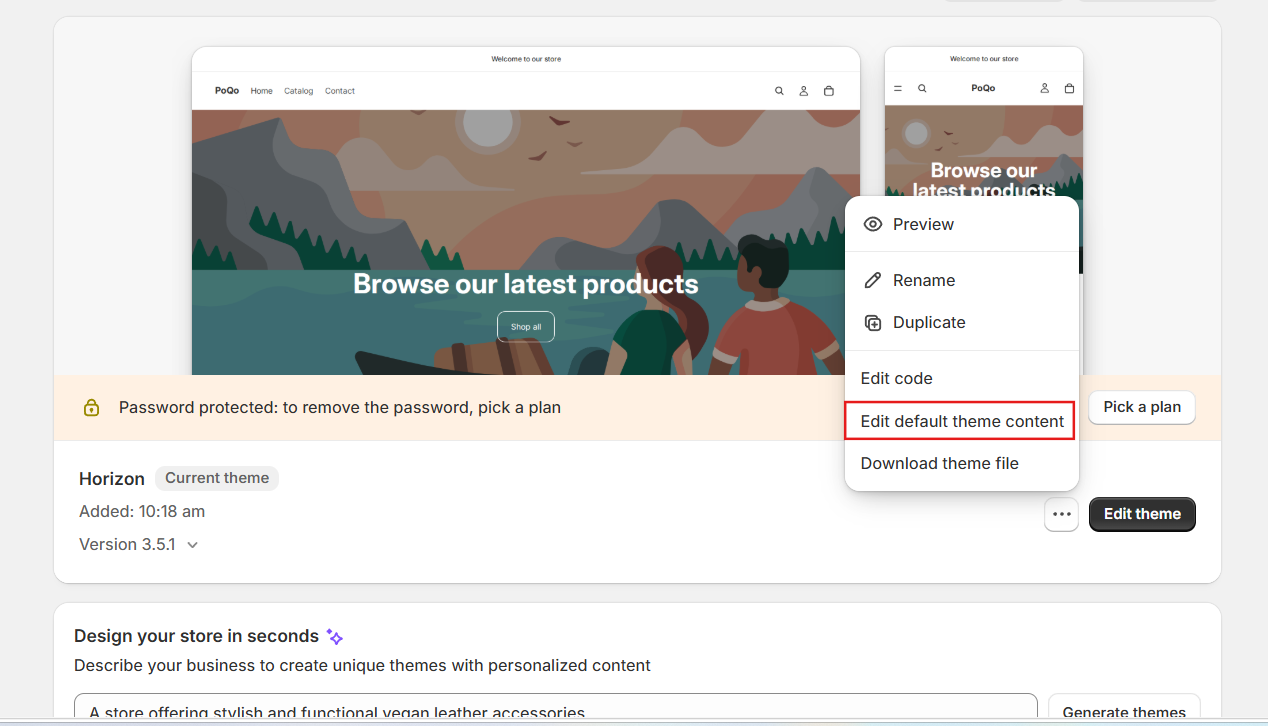
3) Next to your current (active) theme, click the three dots (⋯) or the Actions button.
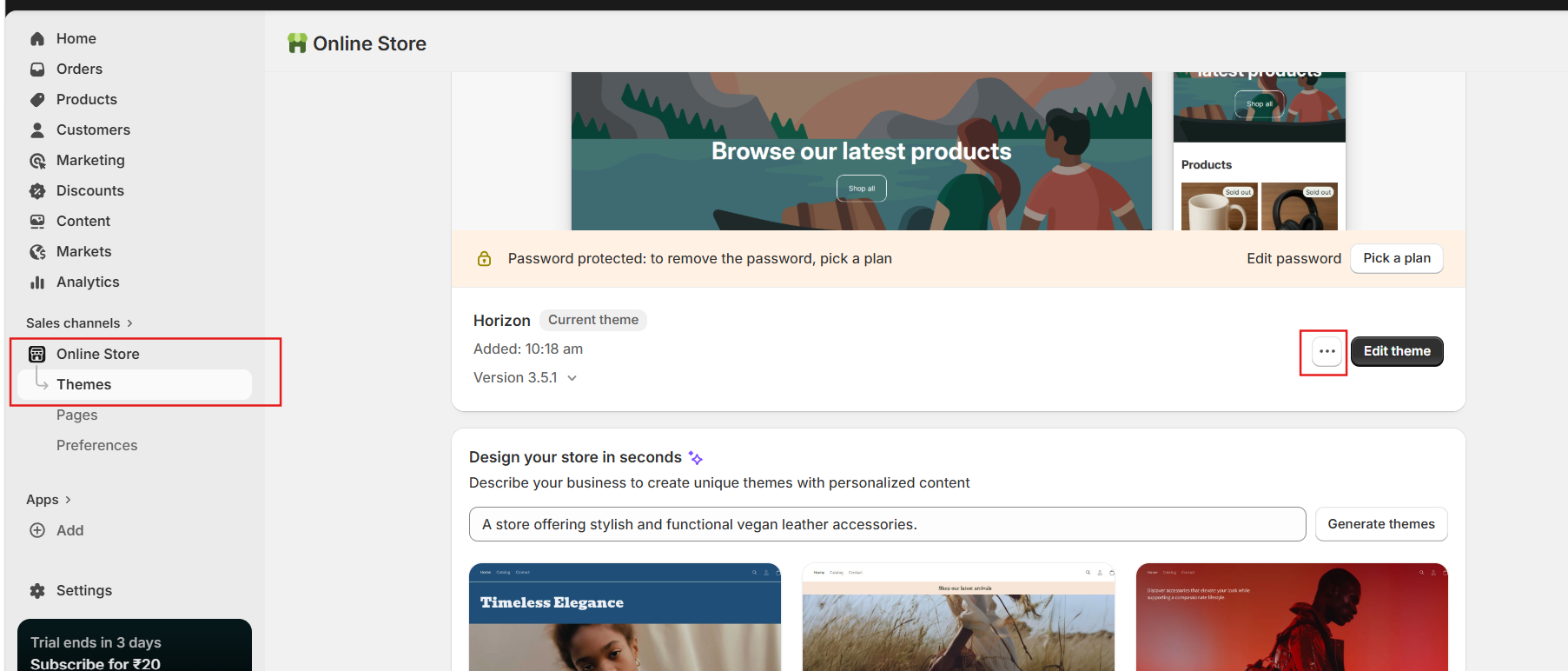
4) Select Edit default theme content (sometimes labelled “Edit languages” in older themes).
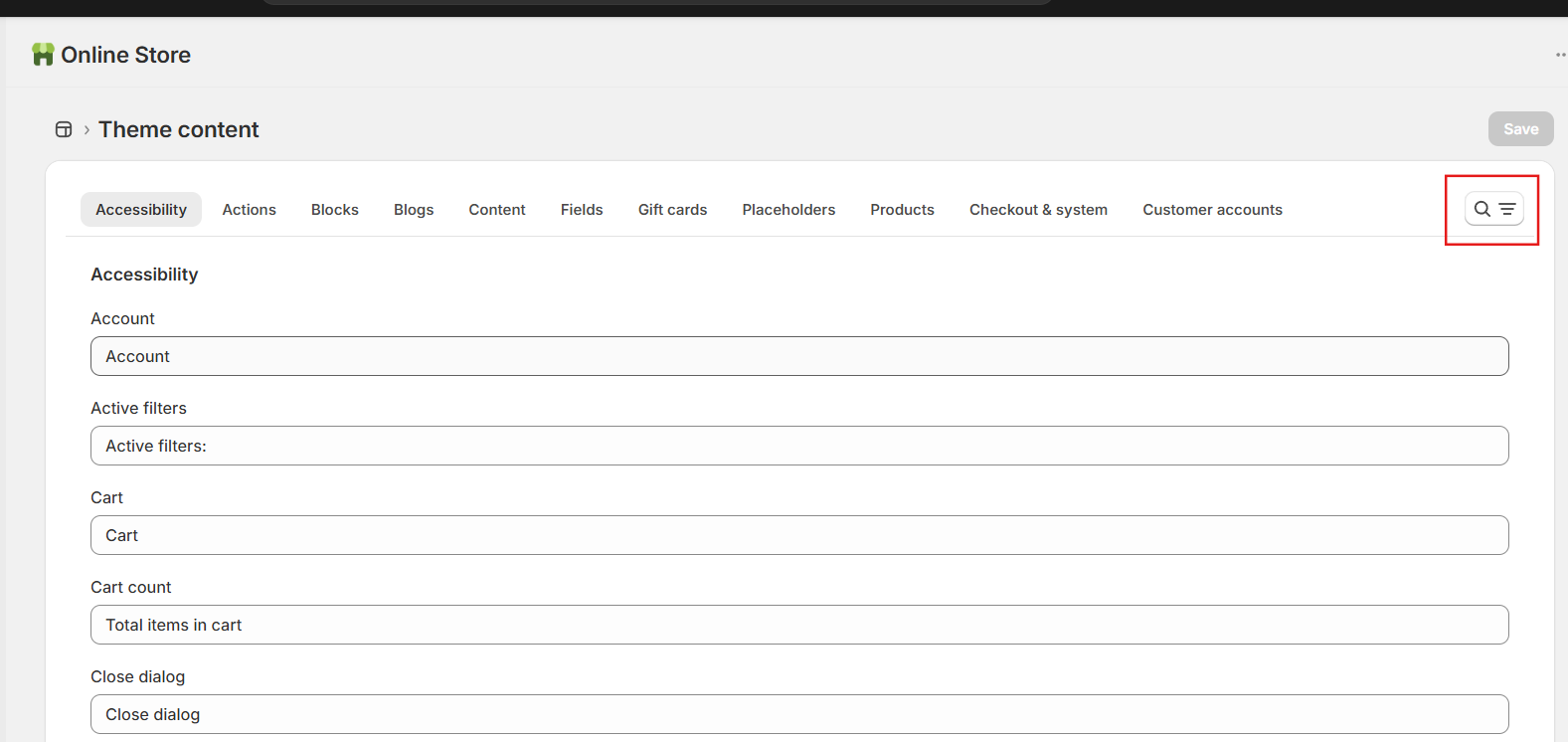
5) In the search/filter bar at the top of the editor, type Powered.
6) You will see a field called “Powered by Shopify”. Click inside it and press the spacebar once, this replaces the text with a blank space. Do not leave it completely empty as some themes require a character.
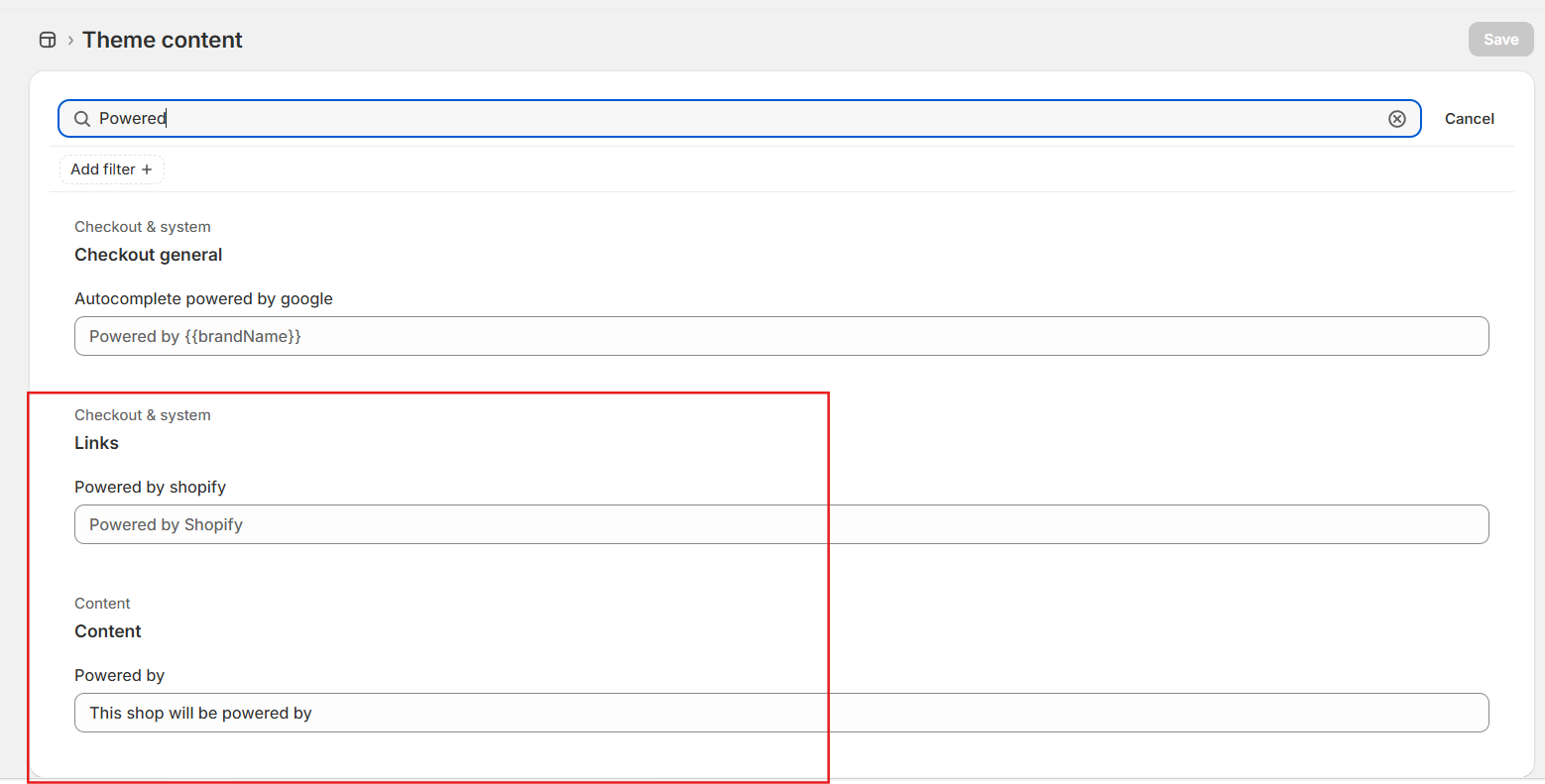
7) If you also see a “Powered by Shopify HTML” field, clear that text too (or press spacebar).
8) Click Save in the top right.
9) Go to Online Store → View your store to confirm the footer is now clean.
Method 2: Theme code editor (advanced control)
Some themes hard-code the “Powered by Shopify” tag directly into the footer template file, bypassing the language file entirely. In that case, Method 1 won’t work because there’s no label to blank out, the tag is written directly into the page structure. This method goes into that file and deletes the one line responsible.
1) From your Shopify Admin, go to Online Store → Themes.
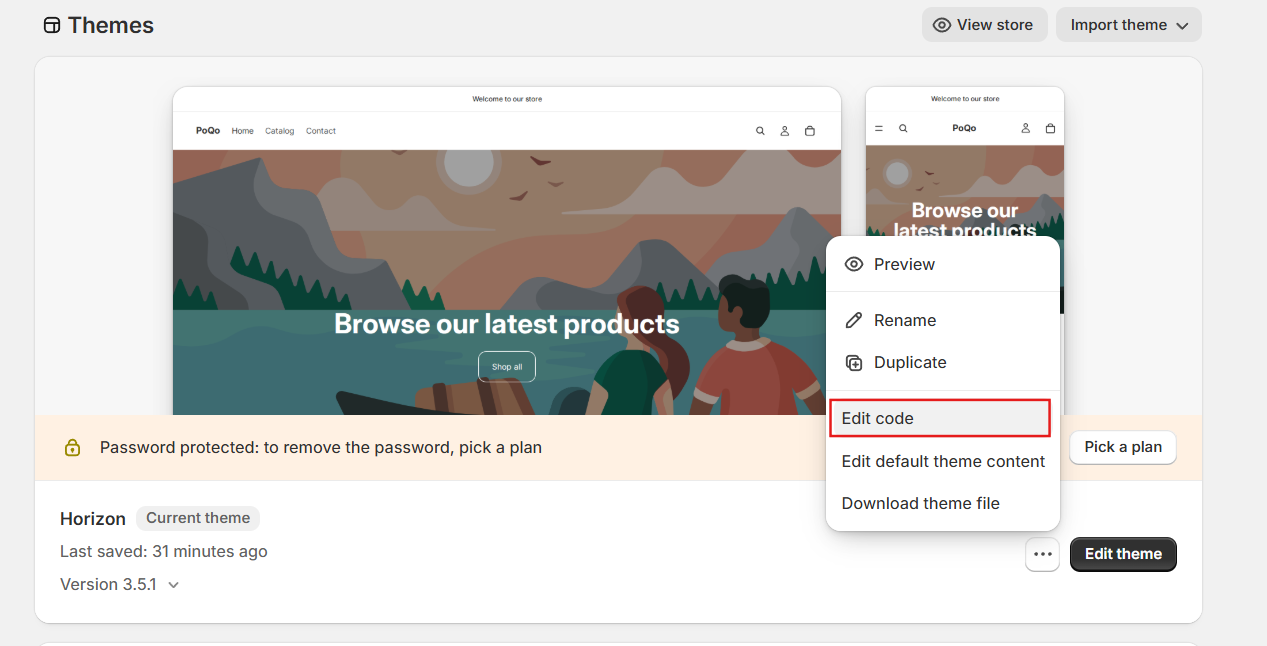
2) Click the three dots next to your active theme and choose Edit code.
3) In the file tree on the left, open the Sections folder and click footer.liquid. (Some older themes use theme.liquid inside the Layout folder.)
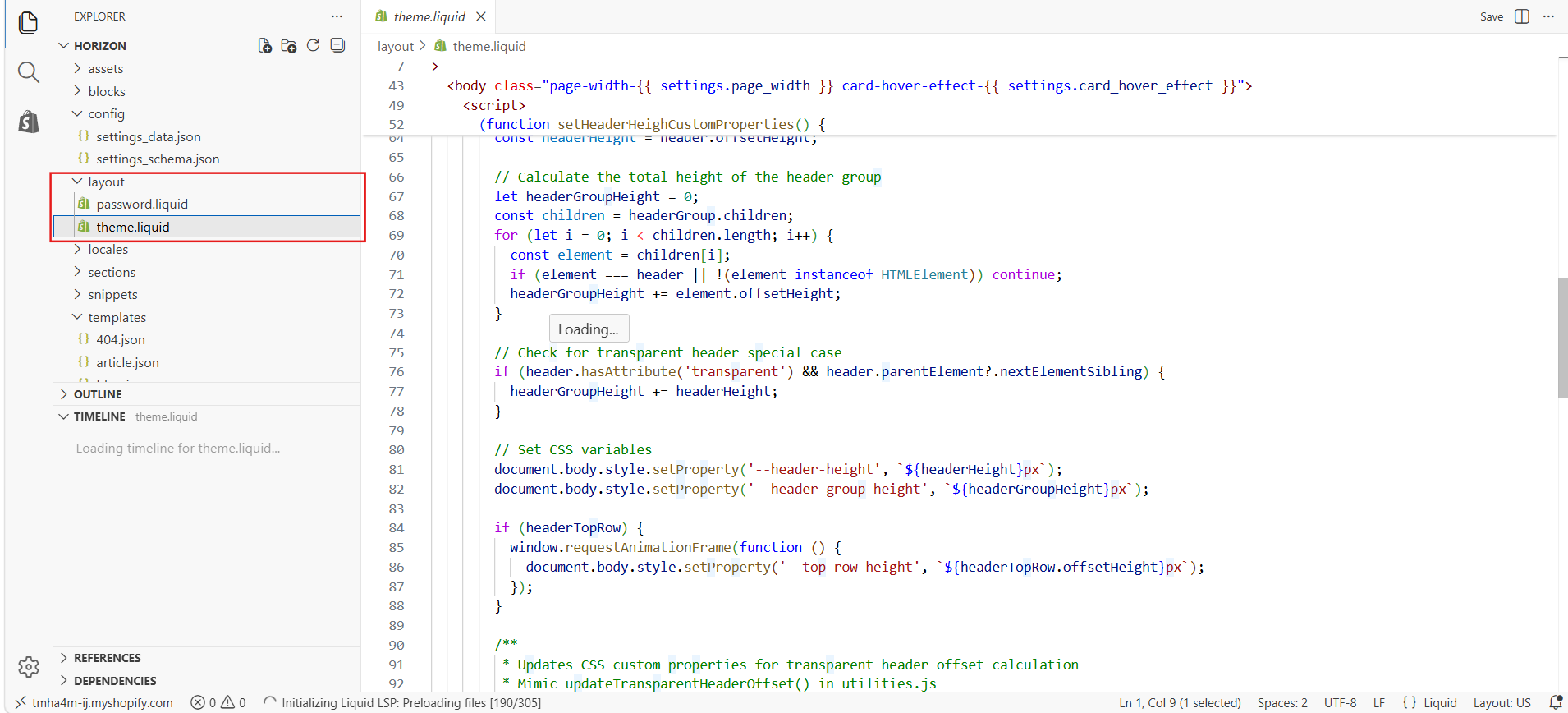
4) Use Ctrl+F (Windows) or Cmd+F (Mac) to search the file for the following:
5) {{ powered_by_link }}
6) Select that entire line and delete it.
7) Click Save in the top right corner of the code editor.
8) Preview your store to confirm the footer tag is gone.
What to put in place of “Powered by Shopify”?
1) Copyright notice: © 202_ (Year) [Your Brand]. All rights reserved.
2) Custom tagline: A short brand slogan or value statement.
3) Trust badges: Secure checkout, return policy, or certifications.
4) Policy links: Privacy policy, refund policy, or shipping info.
Conclusion
Removing the “Powered by Shopify” tag is a simple yet effective way to make your store look more polished and brand focused. Whether you choose the quick language editor method, edit the theme code, or hide it with CSS, each approach gives you control over your store’s appearance.
By replacing it with your own branding, policies, or trust signals, you create a more cohesive shopping experience that keeps visitors focused on your business, not the platform behind it. In a competitive eCommerce landscape, these small refinements can make a meaningful difference in how customers perceive your store.