

Table of Contents
- Introduction
- What Does “Adding Keywords” Actually Mean in Shopify?
- Where to Add Keywords in Your Shopify Store?
- How to Find the Right Keywords Before You Add Them?
- How to Add Keywords to Shopify? Step-by-Step Guide
- Common Keyword Mistakes to Avoid on Shopify
- How Long Does It Take for Keywords to Work?
- Conclusion
If you want customers to find your store through Google search, keywords are essential. Keywords help search engines understand what your pages are about and determine when to show your store in search results.
When you add the right keywords to your Shopify website, your product pages, collections, and blog posts can appear for relevant searches. This increases organic traffic and helps attract buyers who are already looking for products like yours.
According to Google, using relevant keywords in titles, page content, and image descriptions helps search engines better understand website content and improve visibility in search results. However, many store owners don’t know exactly where or how to add keywords to Shopify.
This guide explains what adding keywords means in Shopify, where to place keywords across your store, and provides step-by-step instructions to optimize your store. By the end, you will know exactly how to add keywords to your Shopify website and improve your store’s SEO.
What Does “Adding Keywords” Actually Mean in Shopify?
Adding keywords in Shopify means placing relevant search terms throughout your store’s content, so search engines like Google can understand your pages.
These keywords tell search engines:
1) What your product pages are about?
2) Which searches your site should appear for?
3) How relevant your content is to user queries?
For example, if you sell handmade leather wallets, useful keywords might include:
1) handmade leather wallet
2) men’s leather wallet
3) handmade wallet gift
Instead of placing keywords randomly, Shopify SEO requires adding them to specific areas, such as:
1) Page titles
2) Meta descriptions
3) Product descriptions
4) Image alt text
5) URLs
6) Blog content
Shopify already provides built-in SEO fields that allow store owners to easily add keywords.
If your store requires advanced customization or SEO-friendly design improvements, professional Shopify Theme Development services can also help structure your store for better rankings.
Where to Add Keywords in Your Shopify Store?
1. Homepage Title and Meta Description
Your homepage title and meta description are key SEO elements that appear in search results. Include your primary keyword along with your brand name in the title, keeping it within 50-60 characters. The meta description should clearly summarize your store and naturally include relevant keywords. While it doesn’t directly impact rankings, it plays a major role in improving click-through rates and attracting visitors.
2. Product Page Title and Meta Description
Each product page should be optimized with descriptive, keyword-rich titles that reflect what customers are searching for (e.g., “Handmade Leather Wallet for Men” instead of just “Wallet”). The meta description should briefly explain the product, highlight its benefits, and include keywords naturally. This helps search engines understand the product and encourages users to click on your listing.
3. Product Description
Product descriptions are essential for both SEO and conversions. Write clear, engaging, and informative content that explains the product’s features, materials, and benefits. Use keywords naturally in headings and paragraphs and also avoid keyword stuffing. Bullet points can improve readability, and each product should have a unique description to prevent duplicate content issues.
4. Collection Page Title and Meta Description
Collection pages help target broader, category-level keywords such as “men’s running shoes” or “organic skincare.” The title should clearly describe the product group, while the meta description should summarize the collection and encourage users to explore. Proper optimization helps attract users who are browsing categories rather than specific products.
5. Blog Posts
Blog content is a powerful way to target informational keywords and bring in organic traffic. Create helpful articles, guides, and tips related to your niche (e.g., “How to Choose the Best Leather Wallet”). Use keywords in titles, headings, and content to improve visibility. Blogging also builds trust and establishes your store as an authority in your industry.
6. Image Alt Text
Alt text helps search engines understand your images and improves accessibility. Add short, descriptive text with relevant keywords (e.g., “handmade brown leather wallet for men”). This can also boost your visibility in image search results. Keep alt text clear and concise without overloading it with keywords.
7. URL Handles
Optimized URLs improve both SEO and user experience. Use short, clean, and descriptive URLs that include keywords (e.g., “/products/handmade-leather-wallet” instead of “/item123”). Use hyphens to separate words and avoid changing URLs frequently, as it can affect rankings and existing links.
How to Find the Right Keywords Before You Add Them?
Before adding keywords to your Shopify website, it’s important to identify the terms your target audience is actually searching for. Choosing the right keywords helps your store appear in relevant search results and attract potential customers. Keyword research allows you to understand search demand, competition, and user intent. By using reliable keyword research methods and tools, you can select terms that improve visibility and drive organic traffic to your Shopify store.
Use Google Search (Free Method)
Google Search is one of the simplest ways to find keyword ideas for your Shopify store. When you start typing a phrase into the Google search bar, the autocomplete feature suggests popular searches related to your query. These suggestions come from real user searches, making them highly valuable for keyword research. You can also scroll to the bottom of the search results page to find related search queries for additional ideas.
Use Google Keyword Planner
Google Keyword Planner is a free tool that helps you discover keywords along with their estimated search volume and competition level. By entering a keyword related to your product or industry, the tool generates a list of related keyword suggestions. This helps you identify which terms people search for the most. Choosing keywords with good search volume and moderate competition can help improve your ranking.
Use Tools Like Ubersuggest or Ahrefs (Free Version)
Tools like Ubersuggest and the Ahrefs Keyword Generator provide deeper insights into keyword opportunities. These tools show metrics such as keyword difficulty, search volume, and related keyword ideas. They also help you identify long-tail keywords that may be easier to rank for. Using these tools allows Shopify store owners to build a more strategic SEO plan.
How to Add Keywords to Shopify? Step-by-Step Guide
Step 1: Edit Your Homepage SEO Title and Meta Description
1) Log in to your Shopify Admin Panel.
2) Go to the Online Store → Preferences.
3) Scroll to the Title and Meta Description section.
4) Enter your Homepage Title (including your main keyword + brand name).
5) Add a Meta Description that clearly describes your store and includes relevant keywords.
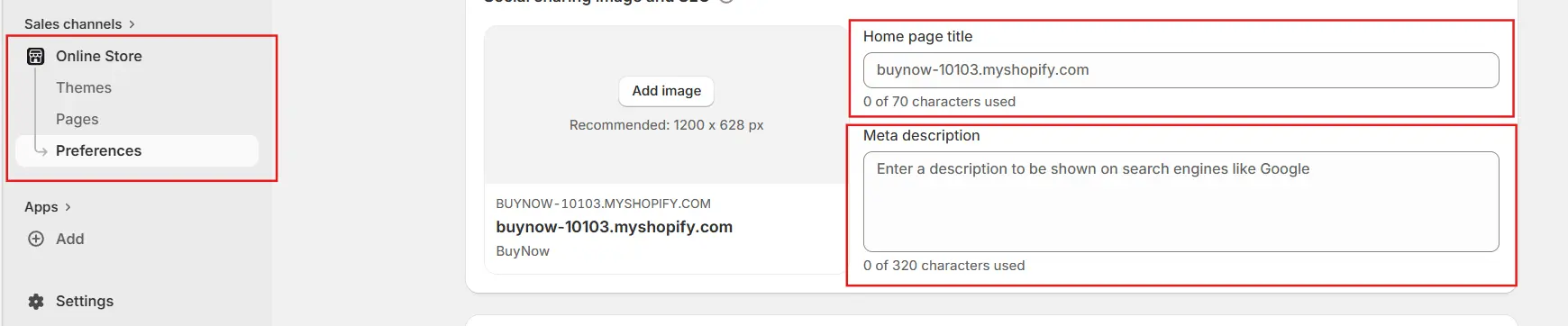
6) Click Save.
Step 2: Optimize Your Product Pages
Each product page should contain keywords that clearly describe the product being sold. Add keywords to the product title, meta title, and meta description through the Search engine listing preview section in Shopify.
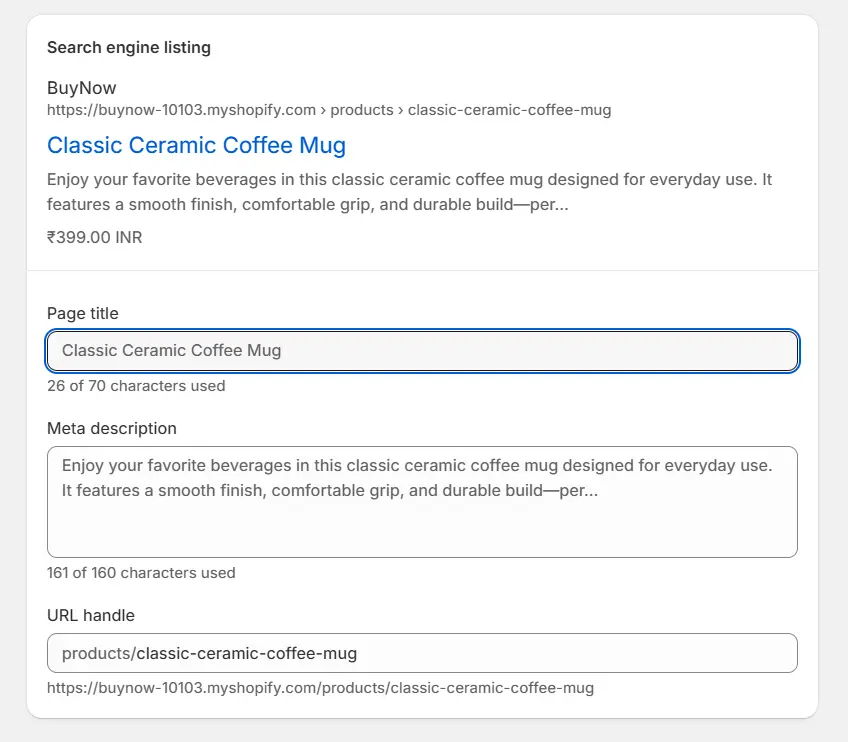
This helps search engines match your product pages with relevant searches. Optimized product pages also improve the chances of attracting customers who are ready to buy.
Step 3: Add Keywords Naturally Inside Product Descriptions
Product descriptions should include keywords naturally while providing helpful information about the product. Focus on explaining features, benefits, and materials in a clear and engaging way. Avoid repeating the same keyword too many times, as this can harm SEO. Instead, write descriptions that are useful for customers and naturally include relevant search terms.
Step 4: Optimize Collection Pages
Collection pages group related products together and help target broader category keywords. Add relevant keywords to the collection of title, description, and SEO meta fields. This helps search engines understand the theme of the page and improves visibility for category-based searches. Optimized collection pages can attract users who are browsing product types rather than specific items.
Step 5: Add Alt Text to Images
1) Go to Products (or Collections/Content where your images are).
2) Open any product or page.
3) Scroll to the Images section.
4) Click on an image.
5) Select “Add alt text” or “Edit alt text.”
6) Write a short, descriptive text including a relevant keyword (e.g., “brown leather wallet for men”).
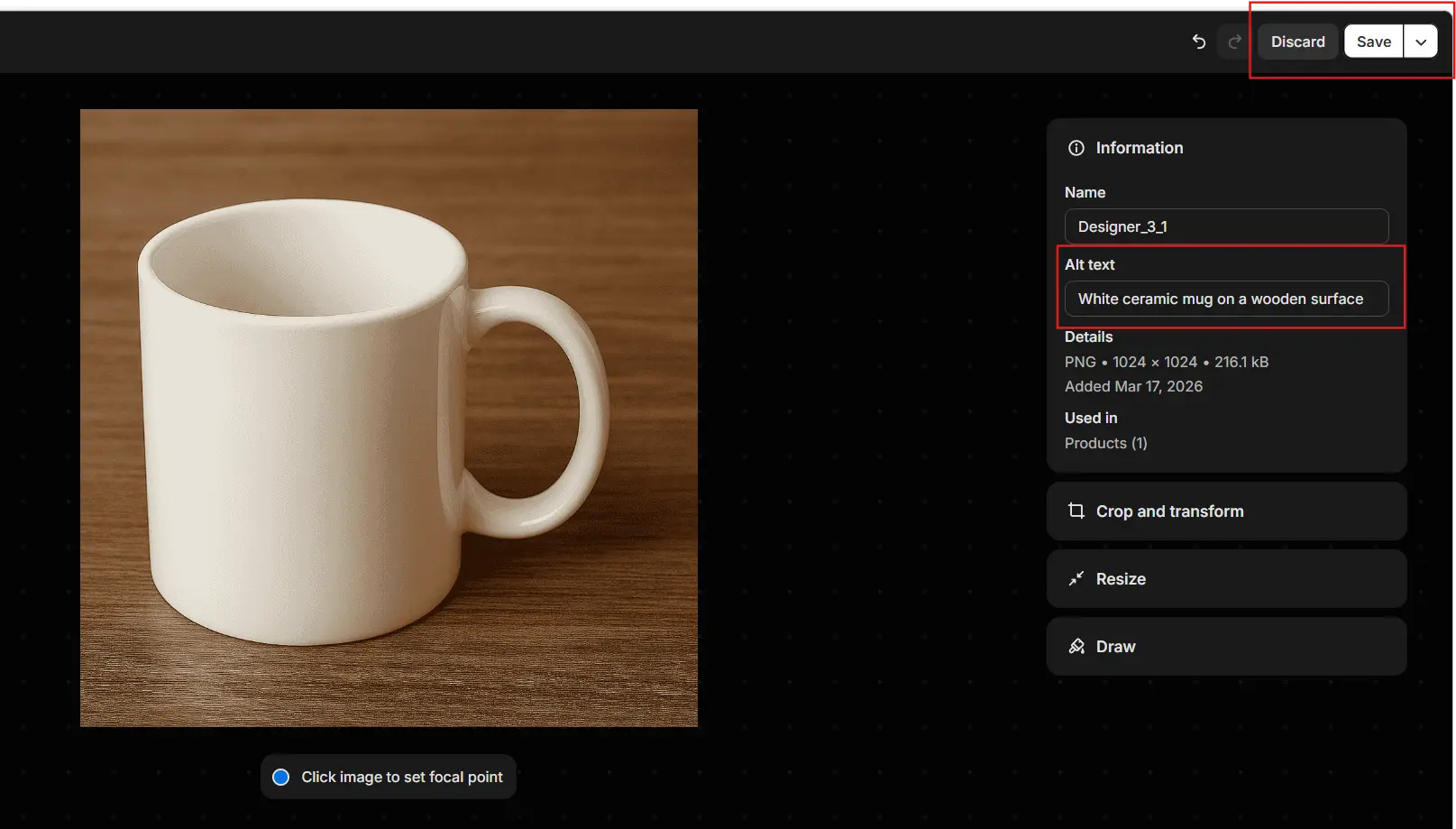
7) Click Save.
Step 6: Edit URL Handles
1) Go to Products, Collections, or Pages in your Shopify Admin.
2) Open the item you want to edit.
3) Scroll down to the Search engine listing preview section.
4) Click Edit website SEO.
5) In the URL and handle field, enter a short, keyword-rich URL (use hyphens between words).
6) Click Save.
Step 7: Write Keyword-Optimized Blog Posts
Blog posts allow Shopify store owners to target informational keywords that customers search for before making a purchase. By publishing helpful articles related to your products or industry, you can attract more organic traffic. Include keywords in the blog title, headings, and content while keeping the writing informative and engaging. Consistent blogging can significantly improve your store’s SEO performance.
Common Keyword Mistakes to Avoid on Shopify
Many Shopify store owners make SEO mistakes that hurt rankings. Avoid these common issues:
1) Keyword stuffing: Repeating keywords excessively can harm SEO.
2) Ignoring meta descriptions: Meta descriptions influence click-through rates.
3) Using generic keywords: Broad keywords are difficult to rank for.
4) Duplicate product descriptions: Search engines prefer unique content.
5) Forgetting image alt text: Images are another source of search traffic.
How Long Does It Take for Keywords to Work?
SEO results usually take time because search engines need to crawl and index updated pages. In most cases, it can take anywhere from a few weeks to several months to see noticeable improvements in rankings. The time frame depends on factors such as keyword competition, website authority, and content quality. Consistent optimization and publishing helpful content can speed up results.
Conclusion
Adding the right keywords to your Shopify website is a powerful way to improve search visibility and attract organic traffic. By researching relevant keywords and placing them strategically across your homepage, product pages, collections, and blog posts, you help search engines understand your content. Following these optimization steps consistently can improve rankings and bring more potential customers to your store.