
Table of Contents
- Introduction
- What are the Various Types of Discount Codes Available in Shopify?
- How to Create a Discount Code in Shopify? (Step-by-Step Guide)
- Discount Code vs. Automatic Discount: Which Should You Use?
- Best Practices for Shopify Discount Codes
- How to Promote Your Shopify Discount Codes?
- Common Mistakes to Avoid
- Final Thoughts
Key Takeaways
Key Takeaways
- Discount codes help increase sales and average order value.
- Shopify offers different types like percentage off, BOGO, and free shipping.
- Use minimum purchase thresholds, customer eligibility, and usage limits to control costs and maximize profitability.
- Strong enough to drive action without heavily impacting margins; reserve deeper discounts for major campaigns.
- Share codes via email, social, and influencers with unique tracking, but don’t over-discount or customers will delay full-price purchases.
According to McKinsey, more than half of shoppers actively look for deals on every purchase they make. Meanwhile, Salsify’s e-commerce Pulse Report for Q2 2025 found that 62% of consumers say limited-time discounts are the number one reason they complete a purchase. The numbers make a compelling case for building a deliberate discount strategy.
And the impact goes beyond just closing sales. Customers who use a discount code spend, on average, 24% more than those who don’t, a stat that reframes discounts not as margin-cutters, but as powerful tools for lifting average order value (AOV).
Beyond raw sales numbers, discount codes also give merchants an analytical edge. Creating unique codes for each marketing channel, email, social, influencer, lets you track exactly which campaign is driving conversions, so you can double down on what works and stop wasting budget on what doesn’t.
What are the Various Types of Discount Codes Available in Shopify?
Shopify’s native discount system offers four core discount structures; each designed for a different promotional goal. Understanding these before you click “Create discount” will save you time and help you choose the right tool for each campaign.
Amount Off Products: Slash prices on specific products or entire collections by a fixed dollar or percentage amount. Great for product-level promotions and targeted clearance.
Amount Off Order: Reduce the total order cost by a flat amount or percentage. Best for sitewide sales and order-minimum incentives like “Get $20 off orders over $100.”
Buy X Get Y (BOGO): Offer a free or discounted product when customers purchase a qualifying item. A top performer for clearing inventory without dropping perceived value per unit.
Free Shipping: Eliminate shipping fees, often limited to specific countries or tied to a minimum purchase amount. The single most powerful purchase motivator in e-commerce.
In addition to these four types, Shopify lets you choose between two delivery methods: a Discount Code (manually entered by the customer at checkout) or an Automatic Discount (applied automatically when eligibility criteria are met). The core difference matters strategically, discount codes require active customer engagement and provide better attribution data, while automatic discounts reduce friction at checkout.
Need help managing discounts, promotions, or ongoing Shopify store updates? Our Shopify support and maintenance team is here to keep your store running smoothly.
How to Create a Discount Code in Shopify? (Step-by-Step Guide)
Creating your first discount code is straightforward. Here’s the complete process inside your Shopify Admin dashboard.
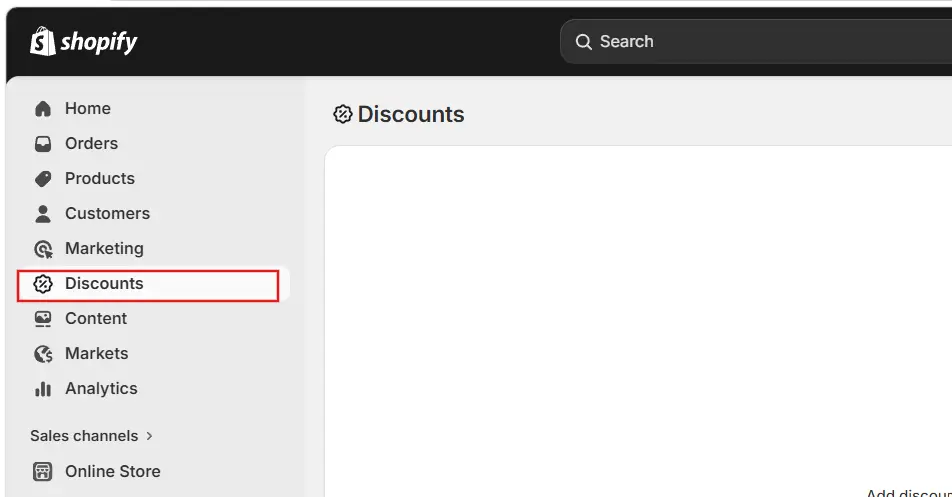
Step 1: Log in & Navigate to Discounts
Head to your Shopify Admin dashboard. In the left-hand sidebar, click Discounts. This is your central hub for all promotions, both active codes and automatic discounts.
Step 2: Click “Create Discount”
Hit the Create discount button in the top-right corner. A modal will appear asking you to select a discount type. Choose Discount code (as opposed to Automatic discount). Then select your discount category, e.g., “Amount off products.”
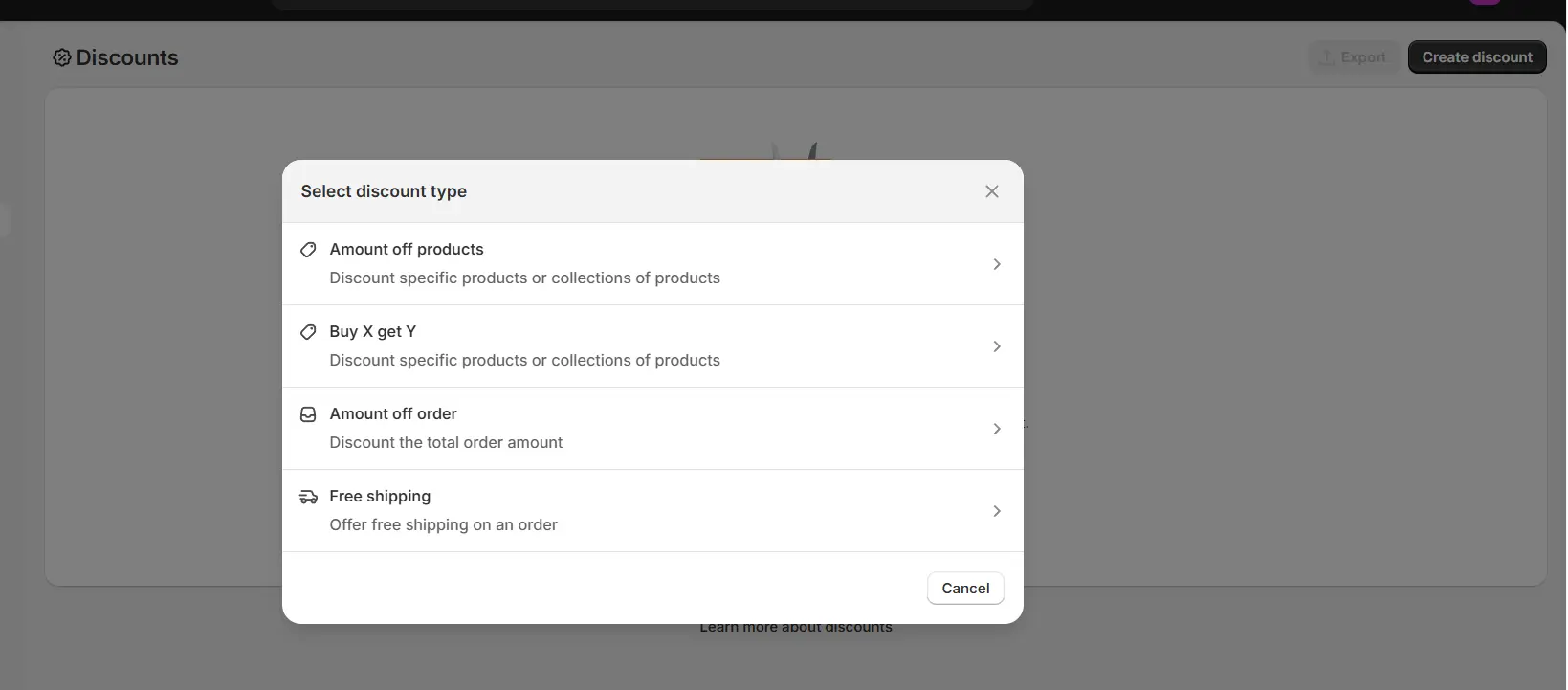
Step 3: Name Your Discount Code
In the Discount code field, enter the code customers will type at checkout. Choose something clear and memorable, examples: WELCOME10, FREESHIP50, SUMMER20. Avoid special characters. You can also hit “Generate” to let Shopify create a random code for you.
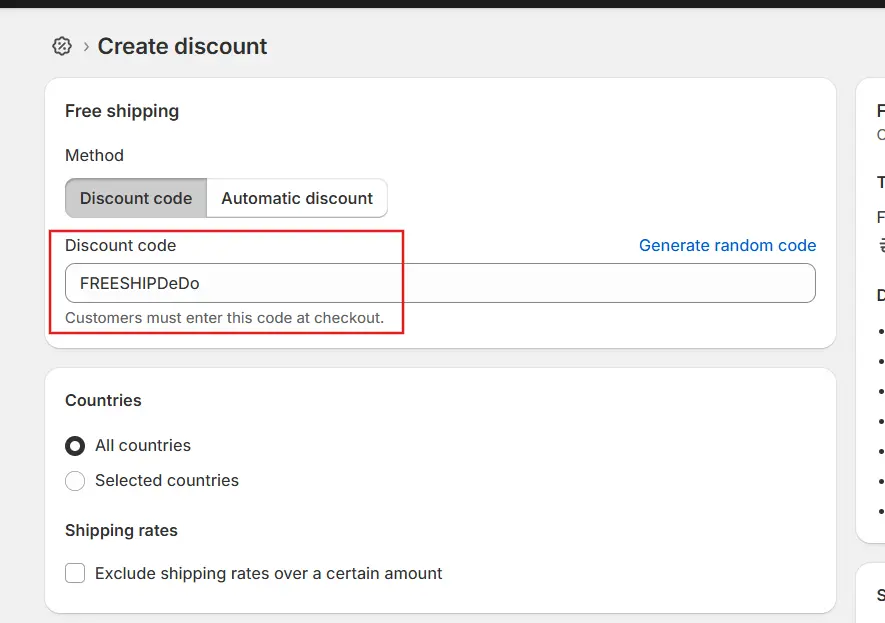
Step 4: Configure the Discount Value
Set whether the discount is a percentage (e.g., 15% off) or a fixed amount (e.g., $10 off). For percentage discounts, research from Shopify suggests 10–20% is a sweet spot that motivates action without severely eroding profit margins.
Step 5: Define Applies To (Scope)
Decide whether the code applies to the entire order, a specific collection, or individual products. Narrowing the scope protects your margins on bestsellers while still running an effective promotion on items you want to move.
Step 6: Set Minimum Purchase Requirements
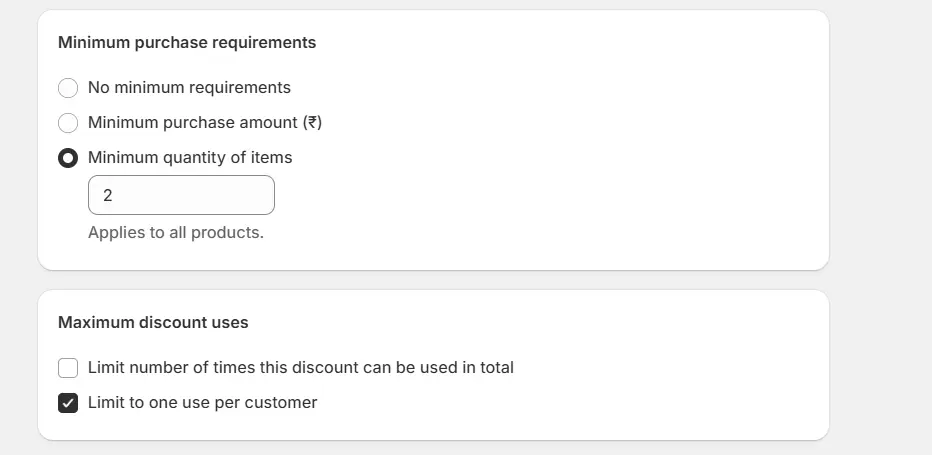
Under Minimum purchase requirements, choose between a minimum purchase amount (monetary value) or a minimum quantity of items. This is one of the most powerful ways to boost AOV, tying a discount to a spending threshold (e.g., “10% off orders over $ 200”) encourages customers to add more to their cart.
Step 7: Set Customer Eligibility
Under Customer eligibility, choose who can use the code: All customers, specific customer segments, or specific customers. For loyalty-focused campaigns, restricting the code to a VIP segment creates exclusivity that feels premium, and reduces budget-draining overexposure.
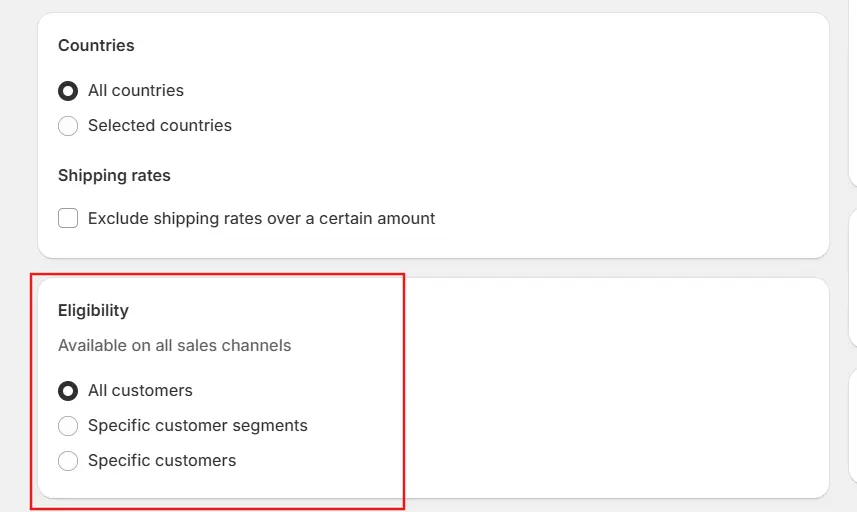
Step 8: Configure Usage Limits
Under Maximum discount uses, enable Limit number of times this discount can be used in total and/or Limit to one use per customer. The second option is essential for welcome codes like WELCOME10 to prevent repeat redemptions. This single setting prevents a huge amount of discount abuse.
Step 9: Set Start & End Dates
Set a Start date for when the code becomes active. Optionally add an End date to create urgency and a natural deadline. Research from Conversion XL shows time-limited discounts increase conversions by 9-15% compared to open-ended offers. Make sure your time zone settings in Shopify Admin are accurate to avoid confusion.
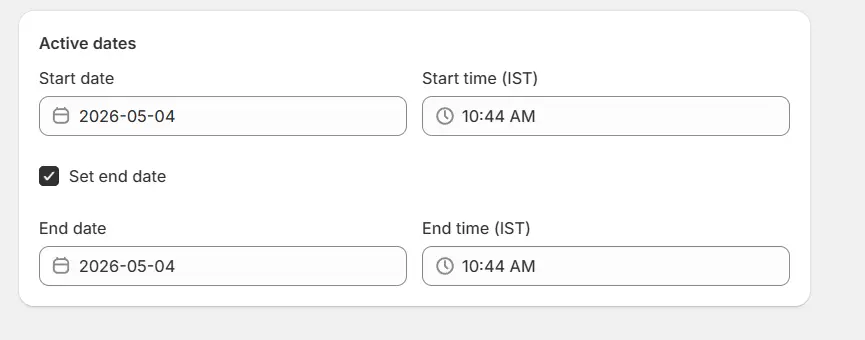
Step 10: Save Your Discount
Click Save discount. Shopify will show you a summary of everything you configured. Your code is now live and ready to be shared. Before promoting widely, always test the code yourself at checkout to verify it works exactly as intended.
Discount Code vs. Automatic Discount: Which Should You Use?
This is a question every Shopify merchant eventually faces. Both methods save your customers money, but they serve different strategic purposes.
Use a Discount Code when: You want to target a specific segment with an exclusive offer (VIPs, newsletter subscribers, referral partners). The added step of entering a code also creates attribution data, you can see exactly which marketing channel drove the redemption by naming codes accordingly (e.g., EMAIL-JULY vs. INSTA-JULY).
Use an Automatic Discount when: You want a frictionless, broad promotion, like a sitewide sale where you don’t want customers hunting for a code. Automatic discounts are applied at the cart stage and are ideal for reaching a wider audience during events like Black Friday or flash sales.
Best Practices for Shopify Discount Codes
1. Choose Memorable, Intent-Clear Code Names: A code like WELCOME10 instantly communicates purpose; that it’s for new customers, and it’s 10% off. Avoid cryptic strings like XJ9KQ2 unless you are intentionally generating bulk unique codes for one-time use. For campaign tracking, use format-based naming like CHANNEL-CAMPAIGN (e.g., EMAIL-AUG25).
2. Find the Right Discount Depth: According to Shopify’s own research, 10–20% is the sweet spot for most e-commerce brand, strong enough to motivate action without heavily eroding profit. Higher discounts (25%+) work best during major events like Black Friday/Cyber Monday, while smaller offers (5-10%) are effective for welcome codes or cart recovery. Before setting any discount, calculate your break-even; for example, if your gross margin is 35% and you offer 20% off, your effective margin drops to roughly 15%, often below the cost of customer acquisition.
3. Always Set Usage Limits to Prevent Abuse: For any customer-facing code, enable “Limit to one use per customer.” For codes shared publicly (on social media or influencer posts), set a total usage cap to control your overall promotional spend. Without these guardrails, a single code going viral can drain your margins overnight.
4. Leverage Free Shipping Strategically: Free shipping is technically a discount, you are absorbing a real cost, but it’s the most powerful purchase motivator in e-commerce. Tying free shipping to a minimum order value (e.g., “Free shipping on orders over $300”) also drives AOV.
5. Create Urgency with End Dates: Time-bounded discounts consistently outperform open-ended ones. Use Shopify’s built-in end date feature and reinforce the deadline in your copy, subject lines, banners, and social captions. Countdown timers on your storefront (via third-party apps) further amplify urgency-driven conversions.
6. Test Before You Promote: Always run a test order using your code before sharing it with customers. Verify the discount amount, eligible products, minimum requirements, and usage limits all behave as expected. A broken discount code during a campaign creates customer frustration that no “sorry” email can fully repair.
7. Don’t Over-Discount: One of the most overlooked risks in discounting is habituation. If customers learn that your store regularly offers 20% off, they will wait for the next sale instead of buying at full price. Excessive discounting has been shown to reduce full-price purchases by 20–40% over time (Harvard Business Review). Use discounts purposefully, for specific occasions, new customers, or loyalty rewards, rather than as a permanent state.
How to Promote Your Shopify Discount Codes?
Creating a discount code is only half the battle. Here’s how to get it in front of the right people:
Email Marketing: Your email list is your highest-ROI channel, email generates an average return of $36–$40 for every $1 spent. Send exclusive codes to segmented subscriber lists. Use unique codes per send to track attribution precisely.
Social Media: Share discount codes in Instagram Stories, Facebook posts, and TikTok videos. Use Shopify’s shareable link feature to auto-apply codes when followers click through, reducing friction dramatically.
Website Banners & Popups: Add an announcement bar or exit-intent popup to your homepage. Exit-intent popups with discount codes convert 1–3% of abandoning visitors, that’s recovered revenue that would otherwise disappear.
Abandoned Cart Emails: Abandoned cart emails have the highest open rate of any email type (40–45%). Including a time-sensitive discount code in a follow-up sequence can recover a significant share of carts that would otherwise be lost.
Influencer & Affiliate Programs: Give unique codes to influencers and affiliates so you can track exactly which partnerships drive purchases. This also lets you reward partners based on actual revenue, not just reach.
Common Mistakes to Avoid
Even experienced Shopify merchants make these errors. Keep them on your radar:
Skipping Usage Limits: Leaving a code open with no per-customer or total-use cap is an invitation for abuse. Always configure limits unless you are running a fully intentional, unlimited sitewide sale.
Discounting without Margin Math: Set your discount value only after calculating the break-even unit volume. A 25% discount on a 30% margin product means you are operating near zero before accounting for marketing costs.
Over-Communicating Discount Availability: If every email, every social post, and every popup leads with a discount, you are training your audience not to buy at full price. Reserve your bigger codes for moments that deserve them.
Ignoring Time Zone Settings: Shopify’s start/end date logic respects the time zone set in your Admin. If your server time zone differs from your target market’s time zone, codes may go live early or expire unexpectedly. Check your Admin settings before scheduling.
Using the Same Code Across Every Channel: If you run one code everywhere, you have no idea whether your sales spike came from email, Instagram, or an influencer. Unique codes per channel cost nothing extra and unlock powerful attribution insights.
Final Thoughts
Shopify’s built-in discount system is genuinely powerful for getting started with promotional pricing. Within minutes, you can create a percentage-off welcome code for new subscribers, a free shipping threshold that boosts AOV, or a BOGO deal that clears seasonal inventory, all without installing a single app.
The key is approaching discounts as strategy, not habit. Used with intention, clear goals, thoughtful targeting, proper usage limits, and consistent tracking, discount codes become one of the highest-ROI tools in your marketing stack. Used carelessly, they train customers to wait for deals and quietly erode the margins that keep your business running.